case studies
Champ - Enterprise HR Platform
Managing employees, payroll, analytics, and operations at enterprise scale across employee and employer sides.

INDUSTRY
Enterprise, HR Tech, SaaS
ROLE
TEAM SETUP
PLATFORM
WebApp
LINKS
-----------
METRICS & REVENUE
1000+ screens, 45+ Enterprise customers after launch
OVERVIEW
What is Champ
Champ is an enterprise HR platform managing the complete employee lifecycle—payroll, attendance, benefits, leave, analytics. It serves two users: employers managing teams and employees accessing their own data.
The problem: Enterprise HR is fragmented. Companies use separate tools for payroll, attendance, benefits, and analytics. HR teams waste hours pulling data from multiple systems. Employees log into different portals for different tasks.
Champ unifies it. One dashboard for employers. One portal for employees. One integrated system instead of scattered tools.
THE PROBLEM
Why Enterprise HR Teams Were Struggling
INFORMATION ARCHITECTURE
How Champ Solves It: Two Separate Portals
Champ's solution is architectural. It serves two users with completely different needs. Employers manage operations through one dashboard: Dashboard, Analytics, Employees, Payroll, HR Operations, Documents, Reports, Benefits, User Access, Configuration.
Employees access their own portal: Dashboard, Attendance, Payslips, Leave Requests, Benefits, Configuration.
This separation is intentional. Employers control. Employees don't see payroll settings. Employees see only what matters to them. Yet both sides use the same design system and navigation patterns for consistency.

THE COMPETITIVE POSITIONING
Why Champ Stands Out
The enterprise HR space has big players: Rippling, DEEL, Workforce HR. They all do payroll, benefits, attendance. But Champ's positioning is different.
Most competitors are built for large enterprises with dedicated HR teams. Champ is built for growing companies (50-500 employees) where one person handles everything. The interface is simpler. Setup is faster. You're not paying for features you don't need.
Champ also prioritizes employee experience. Employees get a clean portal, not a clunky backend. This reduces support tickets and improves adoption.

INFORMATION ARCHITECTURE
Consistency Across 1000+ Screens
LOGIN PAGE & MARKETING OAGES
Communicating Value at First Glance
Before employers log in, they see marketing illustrations communicating key value props. Real-time HR insights at a glance. Benefits your people will actually love. Stay 100% compliant, automatically. Run your global payroll in minutes. Onboard employees 3x faster.
Each illustration is visually distinct but uses the same design system colours and typography. They're not explanations, they're visual promises. Employers see these and immediately understand what they get inside.
EMPLOYEE ONBOARDING FLOW
Getting Companies Set Up Fast
When a company signs up for Champ, they go through guided onboarding to set up their HR operations. Companies enter company profile info, set up work policies, configure HR operations and departments, complete compliance setup, and finalize payment details.
The flow is intentionally structured. No skipping steps. Each screen collects critical setup data. By the end, the company is fully configured and ready to start managing employees immediately.
The result: Companies go from signup to managing payroll, attendance, and leave in hours instead of weeks.

EMPLOYER DASHBOARD & ANALYTICS
Real-Time Visibility Into HR Operations
The employer dashboard gives HR teams complete visibility at a glance. Total employees, payroll cost, compliance status. Below: analytics breaking down payroll by department, salary distribution, tax deductions, total spent.
Analytics also show employee health metrics, benefits enrollment, attendance trends, and leave patterns.
Each metric is actionable. Click "Payroll Analytics" and dig deeper into cost per department, salary ranges, deductions. Click "Employee Analytics" and see headcount trends. Click "Attendance & Leave" and see who's absent, who's requesting leave, patterns over time.
Instead of pulling data from five systems, HR teams see everything in one dashboard. Reports that used to take hours now take minutes.


EMPLOYEE MANAGEMENT
Managing Your Team From One Interface
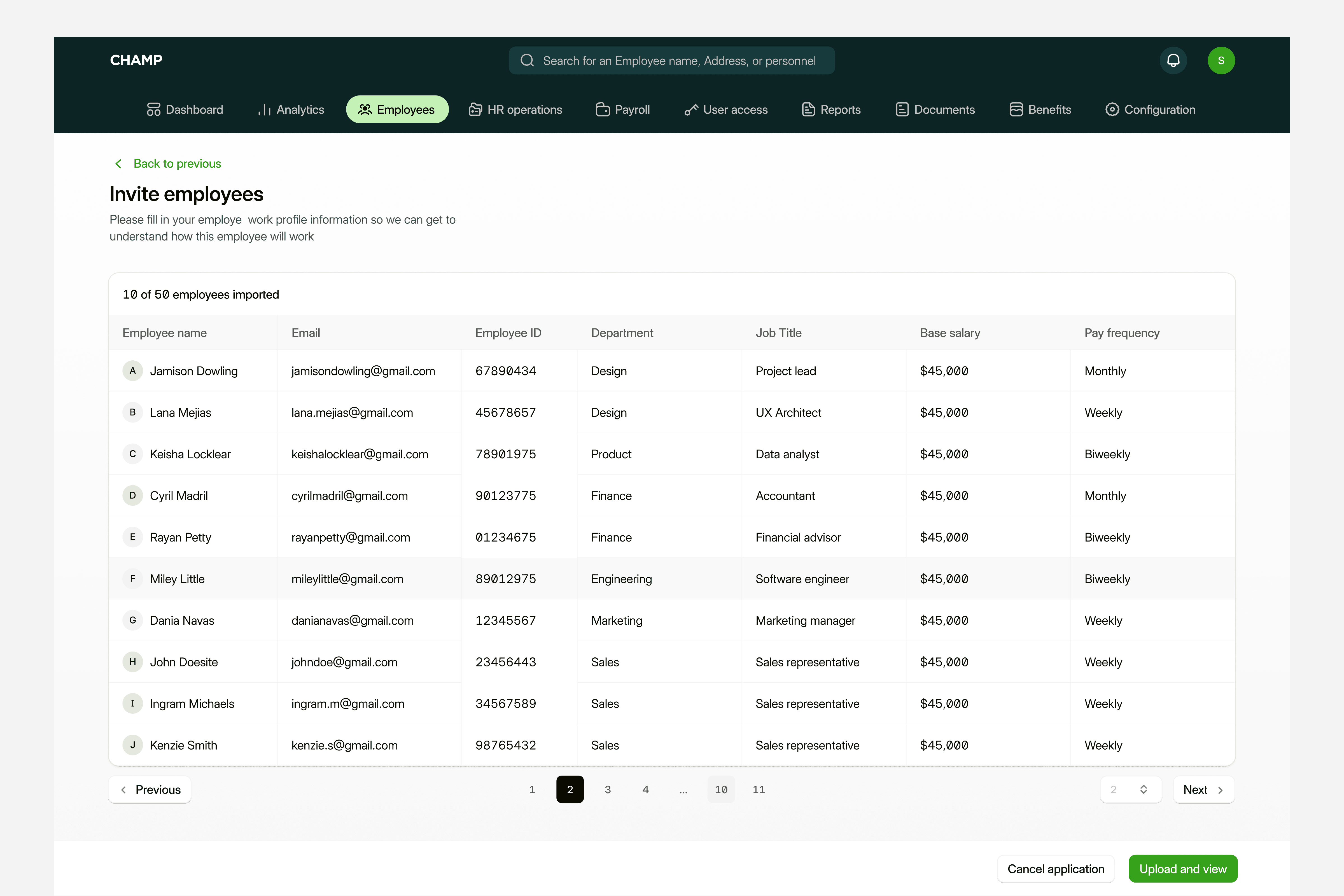
The Employees section is where HR manages their entire team. First, they see the employee list, all current employees with status, role, department, hire date. From here, they can invite new employees, add employees manually, or bulk import via CSV.
When adding an employee manually, HR fills in basic info, then uploads required documents (offer letter, ID, bank details). They add minor details (personal info, emergency contacts) and employment letter details. The platform guides HR through each step.
When inviting an employee, they receive an email. The employee completes their onboarding (entering personal info, payment details, etc.). Once complete, the employee appears in the list as "Active."
When HR clicks on an individual employee, they see the full employee view: personal details, employment info, compensation, documents, payroll, leave balance, benefits enroliment. Everything in one place. HR can update info, adjust compensation, approve documents, all without leaving the platform.
The result: No more spreadsheets. No more scattered employee data.
One source of truth.


PAYROLL MANAGEMENT
Run Global Payroll in Minutes
The Payroll section lets HR manage compensation and pay cycles. Create pay cycles, set frequency, define payroll composition (salary, allowances, deductions, taxes).
Add employees, adjust salaries, review deductions. The system calculates everything automatically.
Before processing, HR reviews the entire payroll. Then approves and processes. Salaries are paid automatically. Payslips are generated instantly for employees to view in their portal.
For global companies, Champ handles multiple currencies, local tax rules, and compliance automatically. What took weeks now takes minutes.
REPORTS & DOCUMENTS
Managing Compliance and HR Records
We studied how DEEL and Rippling handle documents and reporting. Both excelled at one thing: making HR data exportable and auditable. Champ borrowed that approach.
Documents section lets HR upload offer letters, contracts, certifications, and compliance docs. They assign docs to employees, track who's signed, and maintain a complete audit trail. No scattered emails. No lost files.
Reports section lets HR create custom reports,employee reports, payroll reports, benefits reports, attendance reports. Choose report type, select columns, customize data, schedule recurring reports, email to stakeholders. Reports that took hours in spreadsheets now take minutes.
The result: Complete compliance documentation. Audit-ready records. HR teams never wonder "Do we have this signed?"
USER ACCESS & CONFIGURATION
System Settings and Third-Party Integrations
We looked at how Rippling manages system access and integrations. Their strength: simple, secure user management and seamless third-party connections.
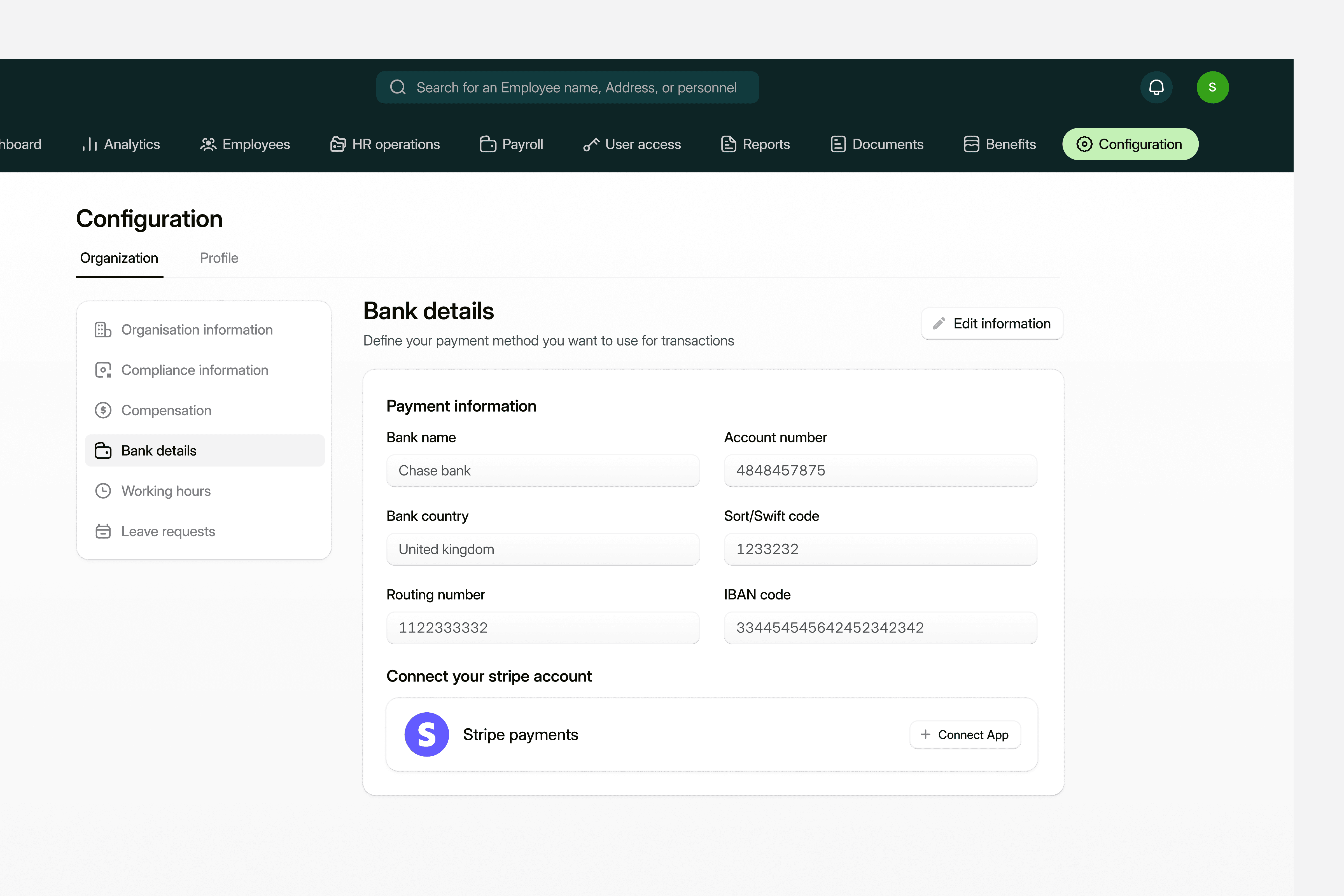
User Access lets HR create accounts, set permissions, manage security roles, and view activity logs. Configuration lets companies set up bank details, payment information, compliance requirements, and work hour policies.
Integrations connect Champ to payroll providers, accounting software, and other HR tools. One employee record flows everywhere. No duplicate data entry. No sync errors.
The result: Secure system. Clean integrations. One source of truth across all tools.
EMPLOYEE ONBOARDING FLOW
Learning From Competitors, Building Better
We studied how Rippling and DEEL handle employee onboarding. Both did one thing well: reduce friction by guiding employees step-by-step through setup. But they still required too much effort from employees. We asked HR teams and employees what frustrated them most: unclear steps, confusing forms, missing information halfway through.
Based on feedback, we designed a guided onboarding that mirrors best practices but simplifies further. When an employee receives an invite, they click the link and start. First screen: review employment details (job title, department, start date, reporting manager). Confirm everything is correct.
Next: enter personal information (name, phone, address, emergency contacts). Then: payment details (bank account, preferred payment method). Then: digital document signing (offer letter, policies, agreements). Finally: confirmation showing they're all set.
One screen, one task. No confusion. Employees onboard in 5 minutes. HR has complete data. No back-and-forth emails.
EMPLOYEE DASHBOARD
Everything an Employee Needs in One Place
The employee dashboard is their home screen when they log in. We designed it based on what employees actually need: payslip access, leave balance, attendance record, benefits info, and recent activity.
The dashboard shows: gross salary, net pay, leave days remaining, attendance clock status, and pending tasks (complete profile, review benefits, sign documents). No clutter. No unnecessary information. Just what matters today.
Employees don't have to dig through menus to find their payslip or check their leave balance. Everything is one tap away. The result: employees feel informed and in control of their employment data.

LEAVE & ATTENDANCE
Request, Track, and View
Employees request leave directly in Champ. Select leave type, dates, reason. Attach documents if needed. The request goes to their manager for approval. They see approval status in real-time.
Attendance records show clock-in/clock-out times, daily hours worked, and monthly totals. Leave balance updates automatically after approval. Everything is transparent.
IMPACT
Metrics and Impact of work
Champ launched as an enterprise HR platform managing the complete employee lifecycle. The challenge was immense: design 1000+ screens serving two completely different users (employers and employees) with zero fragmentation.
TEAM & LEADERSHIP
I led design as the Senior Product Designer with 2 other designers reporting to me. Managing this team meant making hard calls about priorities, maintaining design consistency across 1000+ screens, and ensuring everyone understood the vision. We held daily design critiques, weekly architecture reviews, and constant collaboration with engineering and product.
CHALLENGES WE FACED
Complexity overload. With payroll, attendance, benefits, analytics, and compliance all in one platform, we risked feature bloat. We had to ruthlessly prioritize: What's core? What's nice-to-have? What creates friction?
Two user worlds. Employers and employees needed completely different experiences, but using the same design system. We had to research both extensively interviewing HR teams and employees separately, understanding their pain points, and designing for both without confusion.
Scale and consistency. At 1000+ screens, one bad decision cascades everywhere. We conducted UI complexity research: studying competitor patterns, testing different navigation approaches, and validating with HR teams. We tested onboarding flows with real employees. We tested analytics dashboards with HR teams under tight deadlines.
KEY LEARNINGS
Dual-sided complexity requires clear architecture. We didn't design one platform. We designed two—employer operations on one side, employee self-service on the other.
Enterprise design requires systems thinking. With 1000+ screens, a strong design system wasn't optional. Every button, flow, and colour had to be consistent.
Research prevents redesigns. We tested extensively before shipping. Onboarding flow tests revealed employees hated too many fields per screen. We broke it into smaller steps. Analytics tests showed HR teams wanted summary cards before drilling down. We redesigned accordingly.
Leadership scales design impact. Managing 2 designers meant my decisions affected 3x the output. Mentoring them on design thinking, prioritisation, and systems-level thinking multiplied the team's impact.
THE OUTCOME:
Champ launched and acquired 45+ enterprise customers. The platform manages 54K+ employees globally across clients. What would take weeks in spreadsheets now happens in minutes. HR teams went from stressed to confident.
The case study proved that thoughtful design scales. Even at enterprise complexity, good UX wins. And strong team leadership multiplies impact.

Olayanju idris
Developed by Pixelgumstudio