case studies
Notedrill- AI Note Taker
Helping Professionals & students generate quizzes, flashcards, and summaries from audio, PDFs, images, YouTube, and text with AI. Chat with your documents.

INDUSTRY
AI, EdTech, SaaS
ROLE
TEAM SETUP
1x Front-end engineer, 1x Product Designer, 1X Product lead
PLATFORM
WebApp, Website
LINKS
Notedrill Mobile App
METRICS & REVENUE
OVERVIEW
What is Notedrill
Notedrill is an AI note taker for students who need to learn in their native language. The platform converts any learning material, audio lectures, YouTube videos, PDFs, images, or text into AI-generated summaries, quizzes, and flashcards.
Students upload content and AI does the work. No manual transcription. No hours of note-taking. Instead of studying in a language that's not their own or spending hours translating, Notedrill generates study materials natively in 20+ languages. You get summaries, quizzes, and flashcards in your language, not an awkward translation of English material.
The result: Students study faster, retain more, and actually understand what they're learning instead of getting lost in language confusion.
THE PROBLEM
Why Students Were Struggling


THE SOLUTION
How Notedrill Attacked It
Notedrill automates studying in your native language.
Content Upload: Paste text, upload PDFs, link YouTube, or record audio
Native AI Generation: Creates summaries in 20+ languages (not translations)
Quiz Generation: Instant quizzes powered by AI
Flashcard Creation: Exportable flashcards for spaced repetition
Chat with Notes: Ask questions about your content using AI
Deep Research: Find additional sources to strengthen understanding
Everything happens in minutes instead of hours. Upload content once.
Get summaries, quizzes, flashcards, and AI chat all in your language.
The result: Students stop doing manual work. Language is no longer a barrier. Understanding comes faster.
THE COMPETITIVE LANDSCAPE
Why Notedrill Stands Out
INFORMATION ARCHITECTURE
Mapping the User Journey
The core challenge was making studying seamless. From onboarding (setting up profile) to content upload (audio, video, PDF, text) to AI generation (summaries, quizzes, flashcards) to chat with notes. Each step needed to be intuitive and fast.
Wireframes established the structure: Sign up.
Enter language preference. Upload content (audio record, paste text, upload PDF, link YouTube). AI processes in real-time. Get summaries, quizzes, flashcards, and chat access. Everything happens in minutes, not hours.

PRODUCT UI
How We Positioned Notedrill - Appstore screenshots
App Store screenshots needed to communicate value instantly. Students scroll fast. They don't read long text.
We highlighted core features visually: Generate quizzes, chat with notes, summarize videos/PDFs/images, organize folders, track progress, record audio, export content. Each screenshot showed one feature with minimal copy. The value was obvious at a glance.
Result: 20% of Notedrill's downloads came from App Store discovery, proving the visual approach worked.
ONBOARDING FLOWS
Optimizing for trail conversions
Onboarding needed to be strategic. We studied top apps like Cal.ai and Bible study apps with longer onboarding flows. They ask more questions upfront to personalise the experience and build habit before the paywall.
We asked: What's your learning language? What subjects interest you? How do you prefer to study? What are your goals? Each question personalised the experience.
Then, before hitting the paywall, we added a video walkthrough showing how to upload content, generate quizzes, and chat with notes. Students see the value before they're asked to pay.
The result: Longer onboarding → more personalisation → video proof of value → higher free trial signups and paywall conversion.
DASHBOARD & CREATE NOTE
Home Screen to First Action
Students land on the dashboard seeing four key actions: Create notes, Chat smart, Practice tests, Master flashcards. Recent notes are listed below so they can jump back into previous studies.
When they tap "Create note," a modal opens with six options: Record audio, Upload audio, YouTube links, PDF or documents, Custom text, Image. Each option supports different study habits, recording lectures, uploading files, pasting text, or scanning images.
No unnecessary steps. One tap gets them creating notes.

AI ACTIONS: UPLOAD AUDIO
How AI Processes Content
When students upload audio, Notedrill transcribes it using Whisper AI and simultaneously generates a summary in their native language. Students see the audio, transcript, summary, and notes instantly. They can then chat with the content, generate quizzes, or create flashcards.
This same pipeline works for PDFs, YouTube videos, text, and recorded audio. Upload once. Get summaries, quizzes, and flashcards instantly.
GENERATED NOTE VIEW
Summary & Translation in One Place
After uploading content, students see the generated note instantly. At the top: the original audio or document. Below: AI-generated summary in their native language.
One unique feature: in-note translation.
Students can select any word or phrase and translate it instantly without leaving the note. No jumping to a separate translation app. No disruption. Just tap, translate, continue reading.
Students can also edit the summary, add annotations, or reorganize content. The note becomes their personalized study material.
GENERATE QUIZ
Instant Quiz Creation from Your Notes
From the note, students tap "Generate Quiz." AI creates instant quiz questions based on the summary. Each question tests understanding of key concepts from the material.
Students answer questions, get immediate feedback, and see their score. The quiz reinforces what they learned and identifies gaps. All powered by AI from their own notes.

GENERATE FLASHCARDS
Exportable Flashcards for Spaced Repetition
Students can also generate flashcards from their notes. AI creates front-and-back cards testing key concepts. Cards are exportable to Anki or other spaced repetition apps.
This flexibility means students study however they want in-app or using their preferred flashcard tool. The output is portable.

CHAT WITH YOUR NOTES
RAG-Powered Conversations & Deep Research
One of Notedrill's unique features is chat with your notes using RAG (Retrieval-Augmented Generation). Students can ask questions about their content and get answers grounded in what they uploaded.
Ask "What is solar energy?" and the AI doesn't just answer generically. It retrieves relevant sections from your notes and answers based on what you're studying. You get context-aware responses with source citations.
But students often need more context than what's in their notes. That's where Deep Research comes in. While chatting, students can request "Find more information about this topic." Deep Research scours the internet, finds relevant sources, and adds context to their notes. Now they have a richer understanding backed by external sources.
Students can ask follow-up questions, request clarifications, or dive deeper into concepts. The chat becomes a study buddy that knows what you're learning and finds additional resources to strengthen understanding.


LIBRARY & ORGANIZATION
Organize Your Study Materials
As students create more notes, they need a way to organise them. The library shows all notes, recent activity, and saved materials in one place. Students can create folders by subject"Biology," "Spanish Literature," "Chemistry" and drag notes into folders.
Organisation matters because studying becomes chaotic without structure. Students can quickly find what they need to study next. Folders also help when reviewing for exams and everything related to one subject is together.
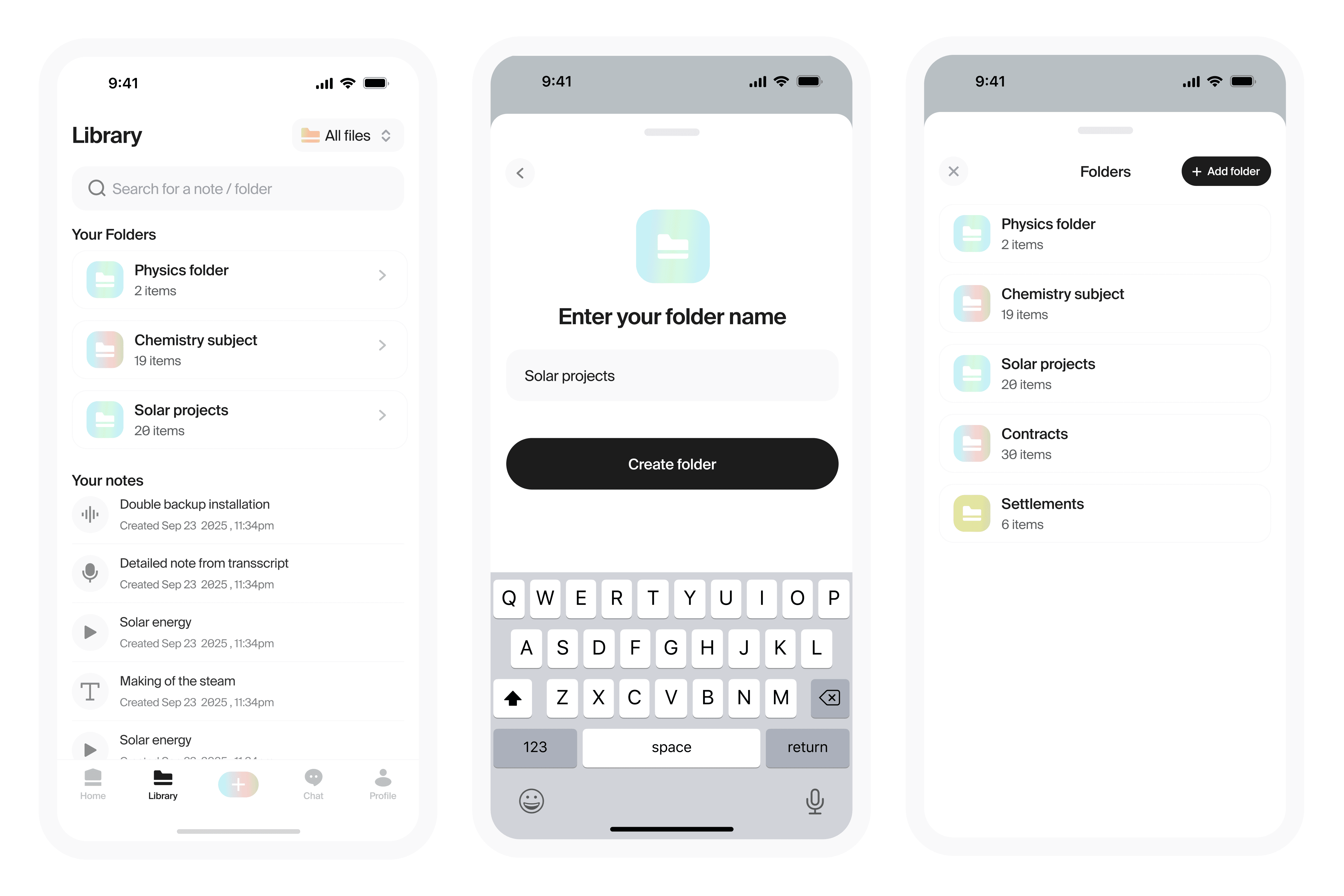

EMPTY STATES AND PATTERNS
Guiding Users When There's Nothing to Show
Empty states matter. When a student creates a new folder, they see "No notes in folder" with a CTA to add notes. When the library is empty, we guide them to create their first note. When chat has no history, we prompt them to start a conversation.
Every empty state has a purpose: guide users forward, not confuse them.
The options menu appears when students tap note menu icons. They can export summaries, delete notes, move to folders, or share with classmates. Clear actions. No hidden features.


DESIGN SYSTEM
Building Consistency Across the Platform
A design system ensures every screen feels intentional and polished. We built Notedrill's system from the ground up: app icons that communicate learning and growth, a custom icon library for 50+ actions,
Suisse Intl typography for clean readability, and a cohesive color palette using pastels and warm tones.
Every button, card, form, and input follows the same patterns. Students don't have to relearn how to interact with the app, consistency builds intuition. Designers and developers work faster because components are predefined, not recreated per screen.
The system also scales. As Notedrill grows, new features use existing components. Consistency is maintained from day one to 1000+ screens.
IMPACT
Metrics and Impact of work
Notedrill launched this year with a focused approach: solve for students who study in non-English languages first. We didn't try to be everything to everyone. We solved one problem deeply.
Growth came from three channels: App Store optimisation (20% of downloads), word-of-mouth from students sharing with classmates, and organic discovery in education communities. No paid ads. No growth hacks. Just a product that solved a real problem.
KEY LEARNINGS:
Language barriers are real. Students who study in their native language engage more, stay longer, and convert to paying users faster. Building for non-English speakers first was strategic.
Onboarding matters. Longer, more strategic onboarding with personalisation questions and video walkthroughs increased free trial conversion by 40% compared to quick signup flows.
Native generation beats translation. RAG-powered chat with sources + Deep Research proved students value grounded answers over generic AI responses. Chat became the sticky feature.
AI needs human control. Students want to edit generated summaries, customise quizzes, and control outputs. AI as a tool, not a replacement.
THE OUTCOME:
A bootstrapped product reached 2K+ users and $1.8K MRR in its first year. Students across 15+ countries now study in their native language. The platform proved that solving for underserved student non-English speakers opens a massive market overlooked by competitors.

Olayanju idris
Developed by Pixelgumstudio